How to check if domain controllers are in sync with each other?

Step 1 – Check the replication health

Run the following command :
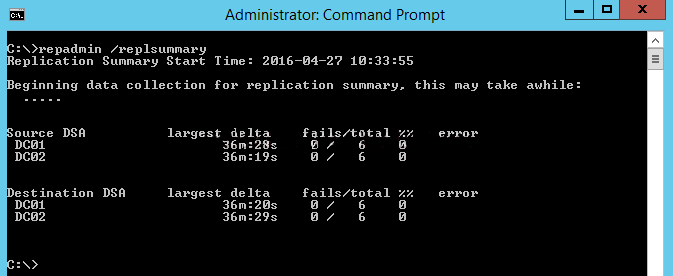
Repadmin /replsummary

The “/replsummary” operation quickly summarizes replication state and relative health of a forest.

how-to-check-if-domain-controllers-are-in-sync-with-each-other

Step 2 – Check the inbound replication requests that are queued.

Repadmin /Queue

This command lists elements that are remaining in the replication queue. It displays inbound replication requests that the Domain Controller needs to issue in order to become consistent with its source replication partners.

how-to-check-if-domain-controllers-are-in-sync-with-each-other-2

Step 3 – Check the replication status

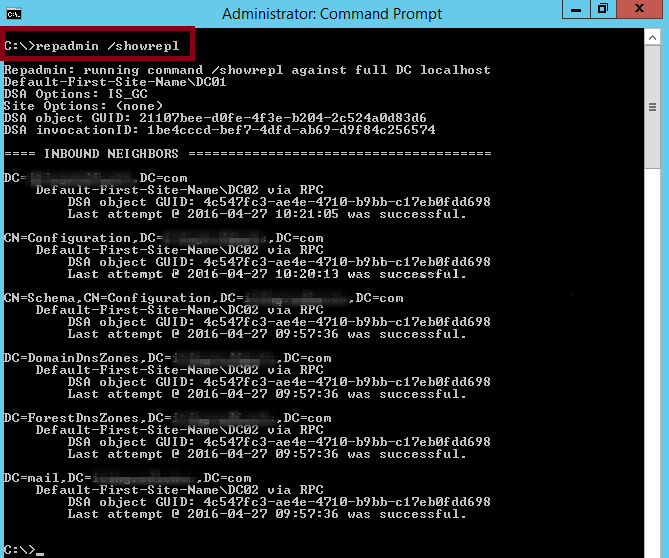
Repadmin /Showrepl

This command displays the replication status when the specified domain controller last attempted to implement an inbound replication of Active Directory partitions. It helps in figuring out the replication topology and replication failure.

how-to-check-if-domain-controllers-are-in-sync-with-each-other-3

Step 4 – Synchronize replication between replication partners

Repadmin /syncall

It ensures synchronization between replication partners

Step 5 – Force the KCC to recalculate the topology

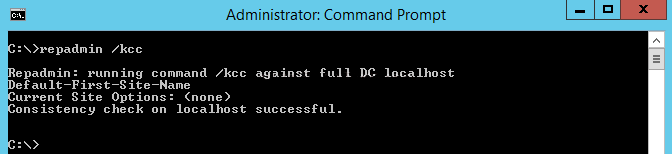
Repadmin /KCC

This command forces the KCC (Knowledge Consistency Checker) on targeted domain controller(s) to immediately recalculate its inbound replication topology. It checks and creates the connections between the Domain Controllers. By default KCC runs in the background every 15 minutes to check if a new connection has been established between DCs.

how-to-check-if-domain-controllers-are-in-sync-with-each-other-4

Step 6 – Force replication

Repadmin /replicate

This command forces the replication of the specified directory partition to the destination domain controller from the source DC.

Nutanix: Streamlining Cloud Management with HCI Solutions

Nutanix is a company that provides enterprise-level software solutions for building and managing private, public, and hybrid cloud computing environments. Their software is based on a hyperconverged infrastructure (HCI) architecture, which combines compute, storage, and networking resources into a single, integrated system. This can simplify IT operations and improve the performance and scalability of an organization’s IT infrastructure. Nutanix’s software is used by organizations of all sizes to support a wide range of use cases, including virtualization, data center consolidation, disaster recovery, and more.

Nutanix software is built on a distributed architecture that allows it to run on commodity hardware, which can help organizations to save on costs compared to traditional, proprietary systems. The software includes a range of features that help to automate and simplify IT operations, such as self-healing and self-balancing capabilities, which can help to improve the availability and performance of an organization’s IT infrastructure.

One of the main use cases for Nutanix software is virtualization, which allows organizations to run multiple virtual machines (VMs) on a single physical server. Nutanix software can support multiple hypervisors, including VMware vSphere, Microsoft Hyper-V, and Citrix Hypervisor, which allows organizations to choose the hypervisor that best meets their needs.

Another use case for Nutanix software is data center consolidation, which allows organizations to reduce the number of physical servers and data centers they need to maintain. Nutanix software can be used to create a shared infrastructure that can support multiple applications and workloads, which can help organizations to reduce their IT costs and improve their resource utilization.

Nutanix also has various disaster recovery solutions, such as Nutanix Site Recovery, which can help organizations to protect their critical applications and data in the event of a disaster. Nutanix Site Recovery can automatically replicate VMs and data to a secondary site, which can help organizations to quickly recover their IT infrastructure in the event of an outage.

Additionally, Nutanix has recently introduced new features to its platform such as Nutanix Era for Database management, Nutanix Calm for Multi-cloud and Kubernetes orchestration, Nutanix Files for File services and Nutanix Flow for Networking and Security, which further expand the use cases for Nutanix platform.

The Path to Wealth: Easy Steps for Real Results.

Step 1.

Create a budget: Start by creating a budget to get a clear understanding of your income and expenses. This will help you identify areas where you can cut back on spending and redirect those savings into investments.

Creating a budget is the process of outlining your income and expenses in order to gain a clear understanding of your financial situation. It is an essential step in achieving financial goals, such as becoming a millionaire.

To create a budget, you should start by listing all of your sources of income, such as your salary, any rental income, or any other sources of money that you receive on a regular basis. Once you have a clear understanding of your income, you should then list all of your expenses. This includes both fixed expenses, such as rent or mortgage payments, and variable expenses, such as groceries and entertainment.

There are several ways to create a budget. One method is to use a spreadsheet or budgeting software to track your income and expenses. Another option is to use the envelope method, where you physically allocate cash to different categories of expenses. Whichever method you choose, the goal is to have a clear picture of where your money is going each month.

Once you have a clear understanding of your income and expenses, you can start identifying areas where you can cut back on spending. For example, you may find that you are spending too much money on dining out or entertainment. By reducing these expenses, you can redirect the savings into investments. This could include contributions to your retirement account, investments in stocks or mutual funds, or even saving for a down payment on a house.

It’s also important to regularly review your budget, ideally on a monthly basis, to ensure that you are staying on track. This will help you make adjustments as needed and ensure that you are on track to achieve your financial goals.

Creating a budget is not a one-time activity, it’s a continuous process that you have to check and adjust as you go. It will also be easier to stick to a budget if you make it specific, measurable, achievable, relevant and time-bound (SMART)

How to use ChatGPT

Wondering how to use ChatGPT? We’ll show you

If you’re wondering how to use ChatGPT, you’re not alone.

This intelligent chatbot, developed by OpenAI, took the internet by storm in late 2022, promising a conversational tone thanks to its machine learning. 

It isn’t just there for a quick chat however, as ChatGPT can answer questions on a range of topics; provide definitions, explanations and recommendations; provide problem-solving advice; and even generate text on a given topic (helpful for writing or translating).

This article is here to show you how to use ChatGPT. So, if that’s what you’re here for, all you need to do now is read on.

How to use ChatGPT

Note: the following steps were taken using Chrome browser, but as ChatGPT runs in a web page, you should be able to recreate the steps using a browser on any device.

1. Head to chat.openai.com(opens in new tab). You’ll need to have an account to use ChatGPT so either select Log in to use an existing account, or select Sign up to create a new one.

2. Select Sign up again and follow the steps to create an account manually, or select Continue with Google/Microsoft to log in using one of those accounts. Here, we’re using a Google account.

3. Enter your name and select Continue.

4. You’ll need to link a phone number. Select your region and enter a phone number, then select Send code.

5. Enter the code you receive.

6. You’re in. Read the message that pops up and then select Next.

7. Read the second message about data collection and privacy, then select Next.

8. Read the third message asking for feedback, then select Done.

9. Now you’re all set up. Type in a question in the chat box at the bottom to get started. Select New chat in the top left at any time to begin a new conversation. 

10. Select the send button.

11. See the response. The more complicated your question, the more extensive an answer you’ll receive.

12. OpenAI want feedback for ChatGPT, so select the like/dislike button next to an answer to submit your thoughts.

13. Type your feedback and select Submit feedback.

There you have it — you now know how to use ChatGPT. Enjoy finding out how quantum mechanics works. Bear in mind that ChatGPT will sometimes make stuff up to fill in any gaps it doesn’t know. For that reason, you certainly don’t want to rely on it for any serious work where accuracy is paramount. 

Crypto Newsletter

Welcome to the latest edition of our newsletter on the world of cryptocurrency!

In this edition, we’ll be diving deep into the recent surge in the price of Bitcoin, which has reached new all-time highs in recent weeks. This rally has been driven by a number of factors, including increased institutional adoption of the digital asset, as well as growing interest from retail investors.

One of the major drivers of this increase in institutional adoption is the increasing number of companies, such as Tesla and Square, investing large sums of money in Bitcoin. This has led to more mainstream acceptance of the digital asset and has helped to boost its price. Additionally, companies like PayPal and Visa have also announced plans to integrate Bitcoin into their systems, further increasing its legitimacy and potential for mainstream use.

Another topic of note is the growing adoption of decentralized finance (DeFi) on the Ethereum blockchain. DeFi refers to a new class of financial applications and services that are built on top of blockchain technology and are decentralized, meaning they are not controlled by any single entity. Some of the most popular DeFi applications include lending and borrowing platforms, stablecoins, and decentralized exchanges.

As more people and organizations adopt DeFi, the demand for Ethereum has increased, leading to a surge in its price. Additionally, the growing number of projects and startups in the DeFi space has led to more innovation and development in the Ethereum ecosystem.

We’ll also take a look at recent developments in the world of stablecoins, which are digital assets designed to maintain a stable value relative to a fiat currency such as the US dollar. These assets have gained popularity as a way to store value and facilitate transactions in the crypto space, and we’re seeing new stablecoins being issued by a variety of organizations. For example, the US dollar-pegged USDC and Tether (USDT) are two of the most popular stablecoin, they are widely used in trading platforms and DeFi applications.

In terms of regulations, governments around the world are beginning to take notice of the growing importance of cryptocurrency and blockchain technology. Some countries, such as Japan and South Korea, have taken a more progressive approach to regulations, while others, such as China, have taken a more cautious approach. It’s important to note that, regulations can have a big impact on the crypto market and should be closely watched.

Finally, we’ll round up the latest news and developments in the crypto space, including new partnerships and collaborations in the industry. For example, the collaboration between Chainlink and Google Cloud to bring data to smart contracts, this could open up new possibilities for the use of blockchain technology in various industries.

In conclusion, the crypto market is constantly evolving and there is a lot to keep an eye on. We hope you found this edition of our newsletter informative and engaging. As always, we welcome your feedback and suggestions for future issues.

Happy reading!

How to setup a new Nutanix host.

Setting up a new Nutanix host involves several steps, including preparing the hardware, installing the Nutanix software, and configuring the network settings. Here is a general outline of the process:

Prepare the hardware by installing the necessary components, such as the CPU, memory, and storage devices.

Download the Nutanix software image and create a bootable USB drive.

Connect to the host using a monitor and keyboard, and boot the host using the USB drive.

Follow the prompts to install the Nutanix software. This process may take several minutes to complete.

Once the installation is complete, you will be prompted to configure the network settings for the host.

Log in to the Nutanix web console using the IP address of the host and the default credentials.

Configure the network settings and other basic settings, like the time zone, host name, and cluster settings.

After the host is configured, you can add it to an existing cluster or create a new cluster.

Once cluster is created, you can add more nodes to the cluster, and configure the storage and network settings for the cluster.

The host is now ready to use, you can start creating virtual machines and deploying applications on the cluster.

Note: it is important to consult Nutanix documentation and best practices as this is a high level explanation and may not cover all the details.

How to Configure vSphere DRS


vSphere Distributed Resource Scheduler (DRS) is a feature of vSphere that automatically balances resources among the hosts in a cluster. To configure DRS, you need to do the following:

Create a cluster: In the vSphere Web Client, navigate to the datacenter or folder that contains the hosts you want to include in the cluster. Right-click the datacenter or folder and select “New Cluster.”

Enable DRS: In the “Cluster Settings” section, select the “Edit” button. In the “DRS” tab, select “Enabled” and set the “Automation level” to “Fully Automated.”

Configure DRS rules: In the “DRS Rules” section, you can configure rules to ensure certain virtual machines are placed on specific hosts or in specific resource pools.

Configure DRS affinity/anti-affinity rules: In the “DRS Rules” section, you can configure Affinity/Anti-affinity rules to ensure certain virtual machines are placed on specific hosts or in specific resource pools.

Configure DRS Advanced options: In the “DRS Advanced options” section, you can configure the migration threshold, host isolation response and more.

Apply the configuration: Click OK to apply the configuration and close the dialog box.

Keep in mind that you will need the appropriate permissions to configure DRS, and that you should test your configuration before deploying it in a production environment.