ESXi 6.5 to 7 Upgrade Using ESXCLI: Essential Steps

To upgrade from VMware 6.5 to 7 using ESXCLI, you can follow the steps below ¹:

  1. Verify that your system meets the upgrade requirements. See ESXi Requirements ¹.
  2. Prepare your environment before upgrading. See Before Upgrading ESXi Hosts ¹.
  3. Determine where you want to locate and boot the ESXi installer. See Media Options for Booting the ESXi Installer ¹.
  4. Connect to the ESXi host using SSH.
  5. Put the host into maintenance mode. See Enter Maintenance Mode for a Host ¹.
  6. Run the following command to stage the upgrade: esxcli software profile update -p ESXi-7.0.0-xxxxxxx-standard -d /vmfs/volumes/datastore/ESXi700/ESXi-7.0.0-xxxxxxx-standard.zip ¹.
  7. Run the following command to start the upgrade: esxcli software profile update -d /vmfs/volumes/datastore/ESXi700/ESXi-7.0.0-xxxxxxx-standard.zip -p ESXi-7.0.0-xxxxxxx-standard ¹.
  8. After the upgrade is complete, reboot the host. See Reboot the Host After an Upgrade ¹.

Please note that the details and level of support for an upgrade to ESXi 7.0 depend on the host to be upgraded and the upgrade method that you use ¹. Verify that the upgrade path from your current version of ESXi to the version to which you are upgrading is supported ¹. For more information, see the VMware Product Interoperability Matrices at ¹.

Understanding Microsoft AOVPN: Key Features and Benefits

Microsoft AOVPN stands for Microsoft Always OVirtual Private Network. It is a remote access solution that is built into Windows 10 and is designed to provide seamless and consistent connectivity for domain-joined, nondomain-joined, or Azure AD–joined devices1AOVPN allows users to access corporate resources securely over the internet, without the need for user interaction or manual configuration2. AOVPN also supports various features and integrations, such as:

These are some of the main aspects of Microsoft AOVPN, but there are more details and nuances that are beyond the scope of this brief explanation. Microsoft AOVPN is meant to be the successor to DirectAccess, which is another remote access solution that has been used for years. However, AOVPN offers more flexibility, compatibility, and security than DirectAccess23. Microsoft AOVPN is available in all Windows editions, and can be deployed and managed with various tools, such as PowerShell, Microsoft Endpoint Configuration Manager, Intune, Windows Configuration Designer, or any third-party mobile device management (MDM) tool1.

Advertisements

What are some alternatives to Ethereum for building DApps?

There are several alternatives to Ethereum for building DApps, each with its own advantages and disadvantages. Some of the most popular ones are:

  • Polygon: This is a layer 2 scaling solution that aims to provide faster and cheaper transactions on Ethereum. Polygon uses a network of sidechains that are compatible with Ethereum and can support various types of DApps, such as DeFi, NFTs, gaming, and more. Polygon also has its own native token, MATIC, which is used for paying fees and staking on the network. Polygon claims to offer up to 65,000 transactions per second (TPS) and near-instant finality12
  • Solana: This is a high-performance blockchain that uses a novel consensus mechanism called Proof of History (PoH), which timestamps transactions and enables parallel processing. Solana also supports smart contracts, cross-chain interoperability, and various DApps, such as Serum, Audius, and Radium. Solana has its own native token, SOL, which is used for paying fees and staking on the network. Solana claims to offer up to 50,000 TPS and sub-second finality3.
  • Cardano: This is a research-driven blockchain that uses a Proof of Stake (PoS) consensus mechanism called Ouroboros, which is designed to be secure, scalable, and energy-efficient. Cardano also supports smart contracts, which are written in a functional programming language called Plutus. Cardano is currently in the process of launching various DApps, such as Catalyst, Atala Prism, and World Mobile. Cardano has its own native token, ADA, which is used for paying fees and staking on the network. Cardano claims to offer up to 1,000 TPS and 20 seconds finality34

These are some of the most prominent alternatives to Ethereum for building DApps, but there are many more that offer different features and trade-offs, such as Binance Smart Chain, Tron, EOS, Cosmos, Avalanche, and Algorand. You can explore more DApps on different blockchain platforms by visiting DappRadar1, which tracks and analyses the top DApps on different blockchain platforms.

Mastering F1 Clash: Pro Cheat Tips and Strategies

Introduction:

F1 Clash, the popular mobile racing strategy game, offers an exhilarating experience for Formula 1 fans. Managing your own team, making strategic decisions, and competing with other players makes for an exciting and challenging gameplay. If you’re looking for ways to gain an edge in F1 Clash, we’ve got you covered with these pro cheat tips and strategies.

1. Learn the Basics:

Before diving into the intricacies of F1 Clash, make sure you thoroughly understand the basics. Familiarize yourself with race types, car components, drivers, and how races are structured. Knowing the fundamentals is essential.

2. Upgrade Wisely:

One of the most critical aspects of F1 Clash is upgrading your car components. Prioritize upgrading the Power Unit and the Aerodynamics, as they have a significant impact on your car’s performance. Investing in these areas early can give you a competitive advantage.

3. Driver Pairings:

Your choice of drivers is crucial. Pairing the right drivers with your car’s strengths can make a substantial difference. For instance, if your car is more powerful, consider pairing it with a driver who excels in Overtaking.

4. Practice Makes Perfect:

Regularly participate in practice races to familiarize yourself with tracks and improve your racing skills. This will help you better understand how your car handles on different circuits.

5. Pit Stop Strategy:

Timing your pit stops is a vital strategic element. Try to pit your drivers at different times to maintain a steady presence on the track. Also, keep an eye on tire conditions to avoid unnecessary pit stops.

6. Weather Conditions:

Weather plays a significant role in F1 Clash. Adapt your race strategy to changing weather conditions. Drivers perform differently in wet conditions, so make sure you have drivers suited for such races.

7. Conserve Energy:

Managing your car’s energy efficiently is key. Avoid using too much boost in the early stages of the race; instead, use it strategically when overtaking or defending.

8. Observe Your Opponent:

Pay attention to your opponent’s moves and adapt your strategy accordingly. If you notice your opponent is conserving energy, consider attacking more aggressively.

9. Join a League:

Joining a league or a club is a great way to earn extra rewards and race against competitive players. It can also provide valuable insights into different strategies.

10. Daily Objectives and Achievements:

Complete daily objectives and achievements to earn valuable in-game currency, which you can use to upgrade your team and car components.

11. Watch Ads for Boosts:

F1 Clash offers in-game ads that you can watch to earn boosts, such as extra cards or currency. Take advantage of this to speed up your progress.

12. Keep an Eye on Events:

Participate in special events and challenges to earn unique rewards and enhance your team’s capabilities.

Conclusion:

F1 Clash is all about strategy and skill. By following these cheat tips and strategies, you can stay ahead of the competition, build a formidable team, and enjoy the game to the fullest. Remember, practice, adaptability, and smart upgrades are the keys to success in this thrilling mobile racing game. So, rev up your engines and get ready to dominate the F1 Clash circuits!


How to check if domain controllers are in sync with each other?

Step 1 – Check the replication health

Run the following command :
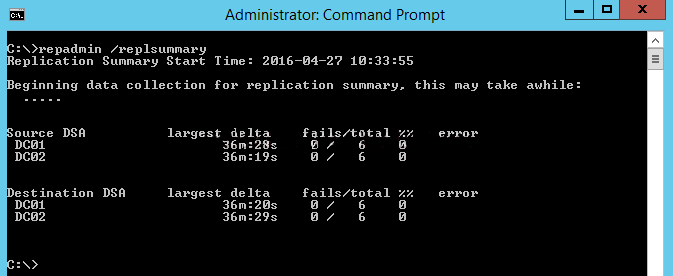
Repadmin /replsummary

The “/replsummary” operation quickly summarizes replication state and relative health of a forest.

how-to-check-if-domain-controllers-are-in-sync-with-each-other

Step 2 – Check the inbound replication requests that are queued.

Repadmin /Queue

This command lists elements that are remaining in the replication queue. It displays inbound replication requests that the Domain Controller needs to issue in order to become consistent with its source replication partners.

how-to-check-if-domain-controllers-are-in-sync-with-each-other-2

Step 3 – Check the replication status

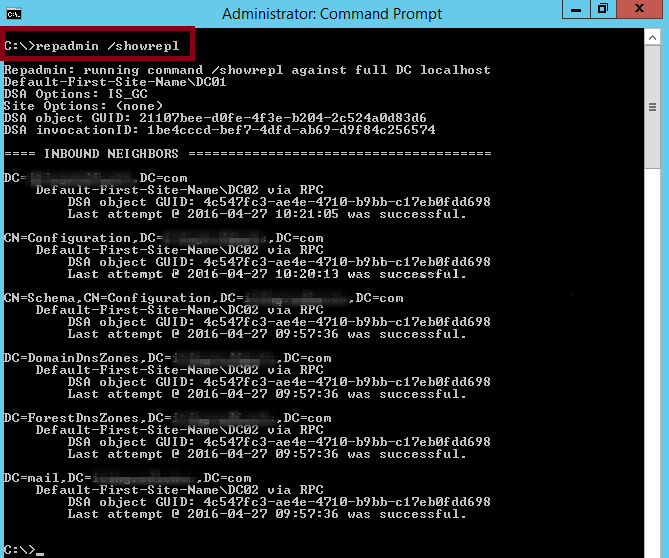
Repadmin /Showrepl

This command displays the replication status when the specified domain controller last attempted to implement an inbound replication of Active Directory partitions. It helps in figuring out the replication topology and replication failure.

how-to-check-if-domain-controllers-are-in-sync-with-each-other-3

Step 4 – Synchronize replication between replication partners

Repadmin /syncall

It ensures synchronization between replication partners

Step 5 – Force the KCC to recalculate the topology

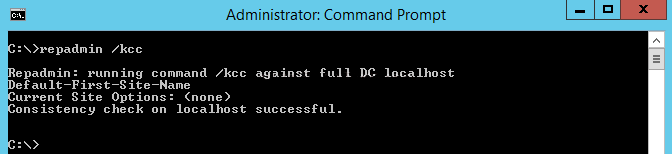
Repadmin /KCC

This command forces the KCC (Knowledge Consistency Checker) on targeted domain controller(s) to immediately recalculate its inbound replication topology. It checks and creates the connections between the Domain Controllers. By default KCC runs in the background every 15 minutes to check if a new connection has been established between DCs.

how-to-check-if-domain-controllers-are-in-sync-with-each-other-4

Step 6 – Force replication

Repadmin /replicate

This command forces the replication of the specified directory partition to the destination domain controller from the source DC.

Nutanix: Streamlining Cloud Management with HCI Solutions

Nutanix is a company that provides enterprise-level software solutions for building and managing private, public, and hybrid cloud computing environments. Their software is based on a hyperconverged infrastructure (HCI) architecture, which combines compute, storage, and networking resources into a single, integrated system. This can simplify IT operations and improve the performance and scalability of an organization’s IT infrastructure. Nutanix’s software is used by organizations of all sizes to support a wide range of use cases, including virtualization, data center consolidation, disaster recovery, and more.

Nutanix software is built on a distributed architecture that allows it to run on commodity hardware, which can help organizations to save on costs compared to traditional, proprietary systems. The software includes a range of features that help to automate and simplify IT operations, such as self-healing and self-balancing capabilities, which can help to improve the availability and performance of an organization’s IT infrastructure.

One of the main use cases for Nutanix software is virtualization, which allows organizations to run multiple virtual machines (VMs) on a single physical server. Nutanix software can support multiple hypervisors, including VMware vSphere, Microsoft Hyper-V, and Citrix Hypervisor, which allows organizations to choose the hypervisor that best meets their needs.

Another use case for Nutanix software is data center consolidation, which allows organizations to reduce the number of physical servers and data centers they need to maintain. Nutanix software can be used to create a shared infrastructure that can support multiple applications and workloads, which can help organizations to reduce their IT costs and improve their resource utilization.

Nutanix also has various disaster recovery solutions, such as Nutanix Site Recovery, which can help organizations to protect their critical applications and data in the event of a disaster. Nutanix Site Recovery can automatically replicate VMs and data to a secondary site, which can help organizations to quickly recover their IT infrastructure in the event of an outage.

Additionally, Nutanix has recently introduced new features to its platform such as Nutanix Era for Database management, Nutanix Calm for Multi-cloud and Kubernetes orchestration, Nutanix Files for File services and Nutanix Flow for Networking and Security, which further expand the use cases for Nutanix platform.

The Path to Wealth: Easy Steps for Real Results.

Step 1.

Create a budget: Start by creating a budget to get a clear understanding of your income and expenses. This will help you identify areas where you can cut back on spending and redirect those savings into investments.

Creating a budget is the process of outlining your income and expenses in order to gain a clear understanding of your financial situation. It is an essential step in achieving financial goals, such as becoming a millionaire.

To create a budget, you should start by listing all of your sources of income, such as your salary, any rental income, or any other sources of money that you receive on a regular basis. Once you have a clear understanding of your income, you should then list all of your expenses. This includes both fixed expenses, such as rent or mortgage payments, and variable expenses, such as groceries and entertainment.

There are several ways to create a budget. One method is to use a spreadsheet or budgeting software to track your income and expenses. Another option is to use the envelope method, where you physically allocate cash to different categories of expenses. Whichever method you choose, the goal is to have a clear picture of where your money is going each month.

Once you have a clear understanding of your income and expenses, you can start identifying areas where you can cut back on spending. For example, you may find that you are spending too much money on dining out or entertainment. By reducing these expenses, you can redirect the savings into investments. This could include contributions to your retirement account, investments in stocks or mutual funds, or even saving for a down payment on a house.

It’s also important to regularly review your budget, ideally on a monthly basis, to ensure that you are staying on track. This will help you make adjustments as needed and ensure that you are on track to achieve your financial goals.

Creating a budget is not a one-time activity, it’s a continuous process that you have to check and adjust as you go. It will also be easier to stick to a budget if you make it specific, measurable, achievable, relevant and time-bound (SMART)

How to Configure vSphere DRS


vSphere Distributed Resource Scheduler (DRS) is a feature of vSphere that automatically balances resources among the hosts in a cluster. To configure DRS, you need to do the following:

Create a cluster: In the vSphere Web Client, navigate to the datacenter or folder that contains the hosts you want to include in the cluster. Right-click the datacenter or folder and select “New Cluster.”

Enable DRS: In the “Cluster Settings” section, select the “Edit” button. In the “DRS” tab, select “Enabled” and set the “Automation level” to “Fully Automated.”

Configure DRS rules: In the “DRS Rules” section, you can configure rules to ensure certain virtual machines are placed on specific hosts or in specific resource pools.

Configure DRS affinity/anti-affinity rules: In the “DRS Rules” section, you can configure Affinity/Anti-affinity rules to ensure certain virtual machines are placed on specific hosts or in specific resource pools.

Configure DRS Advanced options: In the “DRS Advanced options” section, you can configure the migration threshold, host isolation response and more.

Apply the configuration: Click OK to apply the configuration and close the dialog box.

Keep in mind that you will need the appropriate permissions to configure DRS, and that you should test your configuration before deploying it in a production environment.